


It happens every year.
The leaves start to turn, the coffee shops roll out the pumpkin spice, and digital marketers everywhere feel that familiar knot tighten in their stomachs. It’s the pre-peak season anxiety.
Whether your “peak” is Black Friday, the Christmas rush, or a specific industry season, the pressure to capitalize on high-traffic periods is immense. For many businesses, Q4 isn’t just another quarter; it’s the quarter that makes or breaks the fiscal year.
But here is the hard truth: You cannot cram for an SEO exam.

At Apex Search Solutions, we believe that the antidote to panic is preparation. A robust seasonal SEO strategy isn’t about guessing; it’s about analyzing the data, strengthening your infrastructure, and serving your users exactly what they are looking for, right when they need it.
Here is your roadmap to preparing your site for peak season—without the panic.
Phase 1: The “Post-Mortem” Analysis (Look Back to Move Forward)
Before we look at what to do this year, we must first review what happened last year. If you don’t understand your historical data, you are flying blind.
Too many businesses jump straight into keyword research for the new season without auditing their previous performance. Open up Google Search Console (GSC) and Google Analytics (GA4), and ask yourself these three questions regarding the last peak season:
- What pages surprised us? Did a specific blog post or product category page drive unexpected traffic? Often, you will find that “long-tail” informational queries (e.g., “how to choose the right running shoes for winter”) drove qualified leads that you didn’t account for. These are your hidden gems.
- Where did we bleed traffic? Look for pages that had high impressions but low click-through rates (CTR). This indicates that you were visible, but your title tag or meta description wasn’t compelling enough to win the click over a competitor.
- What technical issues cost us money? Did you have 404 errors on discontinued products? Did your server response time spike when traffic hit? These aren’t just IT problems; they are revenue leaks.
Action Item: Create a “Wins and Losses” document from last season. This will serve as the foundation for your strategy this year.
Phase 2: Seasonal Keyword Intent vs. Evergreen Content
There is a distinct difference between your standard “evergreen” SEO strategy and a seasonal one.
During the rest of the year, users might search for broad terms like “best leather jackets.” However, as the holidays approach, the intent shifts. The search queries become more urgent, specific, and transaction-focused. They shift to “leather jackets fast shipping,” “gifts for husband leather jacket,” or “Black Friday coat sale.”
If your site is only optimized for the broad terms, you are going to miss the high-intent traffic that is ready to convert now.
The “Gift Guide” Ecosystem: One of the strongest assets you can build is the seasonal landing page or gift guide. However, a common mistake is creating a new URL every single year (e.g., /gift-guide-2023, /gift-guide-2024).
Don’t do this.
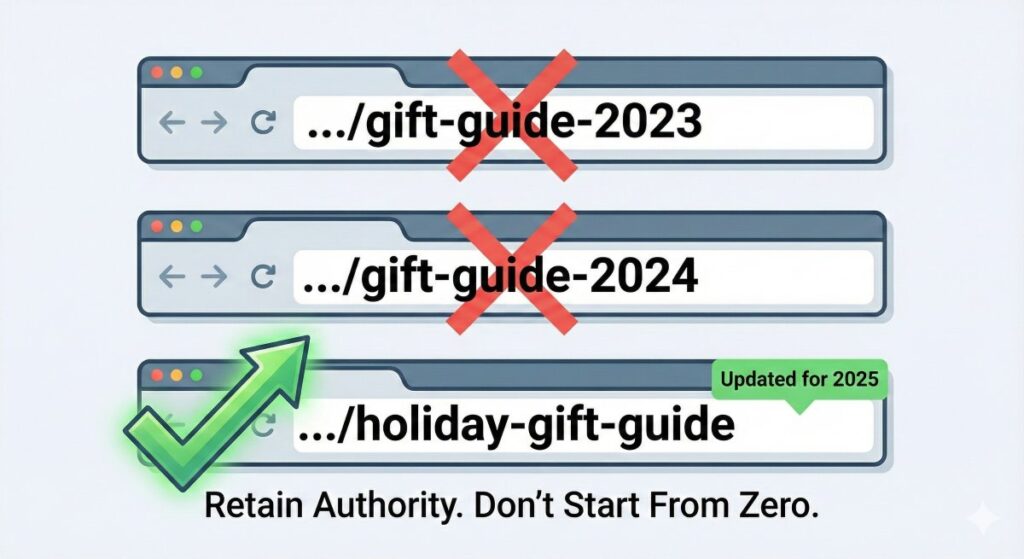
When you create a new URL, you are starting from zero authority. Instead, use a recurring URL structure (e.g., /holiday-gift-guide).
- Off-Season: Keep the page live, but dampen the prominence in the navigation. You can leave a “sign up for updates” form there.
- Pre-Season: Update the H1, the title tag, and the body content for the current year (e.g., “Top Gifts for 2024”).
- The Result: You retain all the backlinks and authority that the page built up over previous years, giving you a massive head start in the SERPs (Search Engine Results Pages).
Phase 3: The Technical Health Check (Before the Traffic Hits)
Imagine inviting 500 people to a party at your house, but you haven’t checked if the plumbing works or if the front door is jammed. That is what driving paid and organic traffic to a technically unsound site is like.
Peak season preparation is largely about risk mitigation.
Speed is Currency. During high-traffic periods, user patience drops to zero. If your mobile site takes 4 seconds to load, that user is gone – and likely heading to a competitor (Amazon takes milliseconds, and that is your benchmark).
- Check your Core Web Vitals: Specifically look at LCP (Largest Contentful Paint). Are your high-res holiday hero images bogging down the load time? Compress them. Use Next-Gen formats like WebP.
- Server Capacity: Can your host handle a 5x or 10x spike in concurrent users? If you are on a shared hosting plan, now is the time to upgrade.

The “Out of Stock” Nightmare. Nothing kills SEO momentum and user trust faster than landing on a product page that says “Out of Stock” with no other options.
Scenario A (Temporary Out of Stock): Keep the page live (200 status code). Don’t 404 it. Add a clear “Notify Me When Available” button and, crucially, show “Similar Products” immediately below. Keep the user in your ecosystem.
Scenario B (Permanently Discontinued): If the product is never coming back, do not leave the page to rot. 301 redirect that URL to the most relevant parent category or a direct replacement product. Do not redirect it to the homepage! That is a frustrating user experience, and Google treats it as a “soft 404” anyway.
Phase 4: Structured Data and “Rich” Wins
In a crowded search result page, you need to stand out visually. This is where Schema Markup (Structured Data) becomes your best friend.
If you aren’t using Product schema, you are invisible. This code tells Google the price, availability, and review ratings of your product, which Google then displays directly in the search results.

For peak season, ensure you are utilizing:
- Offer Schema: To highlight specific price drops.
- Shipping Details: Google now highlights shipping costs and estimated delivery times in search results. If you offer “Free Shipping,” make sure Google knows it.
- Merchant Center: Even for organic listings, ensuring your Google Merchant Center feed is healthy is crucial for appearing in the “Shopping” tab (which is free organic real estate now).
Phase 5: The Content Production Timeline
We mentioned earlier that you cannot cram. So, what does a realistic timeline look like?
August/September: Research & Strategy
This is when you map out your keywords. Identify which product categories will be prioritized. If you are writing long-form content or buyer’s guides, briefs should be created now.
October: Creation & Optimization
Write the content. Update the old gift guides. Distinct landing pages for “Black Friday” or “Cyber Monday” should be published now.
- Tip: Publish them early, even if the sale isn’t live. Use the page to capture email addresses (“Be the first to know when the sale drops”). This allows the page to index and age before the big day.
November: Internal Linking & Promotion
Your pages are live. Now, pass the authority to them. Go to your highest-authority blog posts (your “power pages”) and add internal links pointing to your seasonal content.
- Example: If you have a high-ranking post about “Home Decor Trends,” add a section linking to your “2024 Holiday Home Decor Sale” page.
Phase 6: The “Code Freeze” (The Safety Net)
This concept, borrowed from software development, is one that every marketer needs to adopt.
At a certain point – usually one to two weeks before your peak days – you must stop changing things.
No new plugins. No major design overhauls. No migration of databases.
Why? Because if you install a new “Social Proof Popup” plugin the day before Black Friday and it conflicts with your checkout script, you could lose thousands of dollars before you even realize the cart is broken.
During the Code Freeze, the only allowed changes are critical content updates (changing a banner, updating a price). The infrastructure must be locked down.
Phase 7: Post-Peak Strategy (Don’t Just Delete It)
The season ends. The confetti is swept away. Now, what do you do with those seasonal pages?
The worst thing you can do is delete the page (404). As mentioned in Phase 2, that destroys the link equity you just built.
The Cleanup Protocol:
- Remove from Navigation: Take the holiday links off the main menu.
- Update the Content: Change the text from “Buy Now for Christmas” to “See what we had in store for 2024 – and sign up to be ready for 2025.”
- Redirect (If necessary): If you created a specific landing page that absolutely cannot be reused (e.g., a specific contest page), 301 redirect it to the most relevant evergreen category.
Control the Controllables
Panic usually stems from the unknown. It comes from wondering, “Will the site hold up?” or “Did we target the right words?”
By starting your seasonal SEO audit early, validating your technical performance, and building a content strategy that aligns with user intent, you remove the unknown. You replace panic with process.
At Apex Search Solutions, we know that high rankings aren’t a holiday miracle – they are the result of consistent, intelligent architecture and strategy.
If you are looking at your Q4 roadmap and feeling that familiar tightness in your chest, let’s talk. We can help you audit your current standing and build a strategy that ensures your site isn’t just surviving the peak season, but dominating it.
Ready to prep without the panic? Contact Apex Search Solutions today for your pre-season audit.